

Introduction
Desktop 3D printing has progressed far beyond operating a single machine on a workbench. Modern fabrication environments increasingly combine hardware, software, material management, monitoring systems, and post-processing tools into an integrated workflow that improves productivity and consistency. Whether used for education, product development, engineering, creative design, or small-scale manufacturing, an organised desktop fabrication setup enables users to complete projects more efficiently while maintaining reliable print quality.
Workflow efficiency has become especially important as desktop manufacturing continues to expand into professional applications. Poor organisation often leads to wasted materials, inconsistent results, unnecessary downtime, and longer production cycles. In contrast, a carefully planned fabrication ecosystem allows every stage of production, from model preparation to final finishing, to work together seamlessly.
Rather than focusing only on selecting a capable 3D printer, users benefit from considering the complete production process before investing in equipment. Building an efficient desktop fabrication workflow creates a stronger foundation for long-term success, supports future expansion, and helps users maximise the value of every printed project.
What Makes a Complete Desktop Fabrication Setup
A successful desktop fabrication environment consists of several interconnected components that contribute to consistent production rather than relying solely on the printer itself.
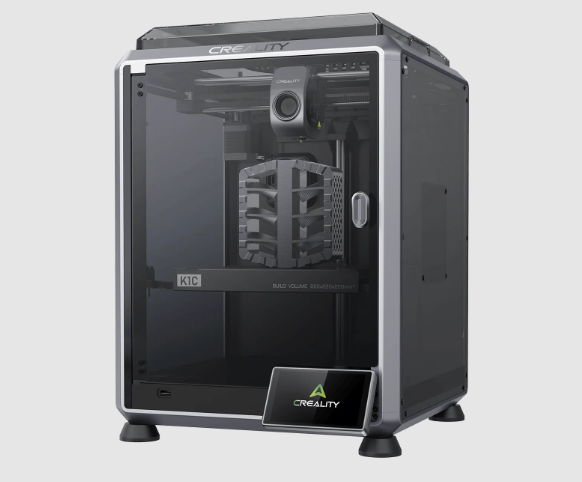
The printer serves as the central piece of the workflow, but its performance depends heavily on supporting equipment. Choosing a reliable machine with stable mechanics, user-friendly controls, and compatible software simplifies everyday operation while reducing troubleshooting time.
Material handling is equally important. Proper storage containers, filament dryers, labelled inventory systems, and humidity control protect printing materials from moisture, preserving print quality and reducing failed jobs. Well-organised material management also saves time when switching between projects.
Slicing software transforms digital models into printable instructions. Modern slicers provide extensive control over layer height, support structures, print speed, infill density, and material profiles. Learning how to optimise these settings allows users to balance print quality, strength, and production speed according to project requirements.
Monitoring tools have become increasingly valuable as printers gain remote connectivity. Integrated cameras, cloud management platforms, and real-time notifications enable users to supervise long print jobs without remaining physically present throughout the entire process.
Post-processing equipment completes the fabrication cycle. Depending on the printing technology, this may include sanding tools, curing stations, cleaning supplies, precision cutting tools, polishing equipment, or painting materials. Including these resources within the workflow ensures printed parts achieve their intended appearance and functionality.
Planning a Workflow Before Buying Equipment
Many first-time buyers concentrate on printer specifications without evaluating how the entire workspace will function. Careful planning before purchasing equipment often prevents unnecessary expenses while supporting future growth.
The first consideration involves identifying project requirements. Educational models, engineering prototypes, decorative artwork, mechanical components, and production parts all require different combinations of hardware, materials, and finishing techniques. Defining the intended applications allows users to prioritise the most relevant equipment.
Workspace planning also deserves careful attention. Adequate ventilation, electrical capacity, stable work surfaces, storage space, and lighting all contribute to safe and efficient operation. Organising equipment into dedicated work zones for printing, material storage, post-processing, and quality inspection creates smoother production workflows.
Budget allocation should extend beyond the printer itself. Filament, spare nozzles, maintenance tools, cleaning supplies, slicing software, replacement parts, and storage systems all represent ongoing operational costs. Investing wisely across the entire workflow frequently delivers greater long-term value than spending the majority of the budget on hardware alone.
Future expansion should also influence purchasing decisions. Selecting equipment that supports additional materials, upgraded accessories, cloud connectivity, or multiple printers allows users to scale production without replacing the entire setup.
The Advantages of Integrated Printing Systems
Integrated fabrication systems provide measurable benefits by reducing complexity throughout the production process. Rather than assembling unrelated components from multiple sources, many users now prefer a 3d printer combo that combines compatible hardware, software, accessories, and material support within a unified ecosystem. Platforms such as store.creality.com reflect this approach through Creality’s long-standing commitment to advancing consumer 3D printing since 2014. Beyond desktop printers, its “One Core with Two Wings” strategy extends to 3D scanners, laser engravers, filaments, accessories, and Creality Cloud, creating a connected environment that supports users from initial design through final production.
One immediate advantage is faster setup. Components designed to work together generally require less configuration, allowing users to begin printing more quickly while reducing compatibility issues between hardware and software.
Consistency also improves because integrated systems typically include validated print profiles, material settings, and firmware updates that work together. This reduces trial-and-error adjustments and helps maintain predictable print quality across multiple projects.
Maintenance becomes simpler when equipment shares compatible accessories, replacement parts, and support documentation. Troubleshooting is often more straightforward because fewer variables exist within the production environment.
Learning curves are reduced as users become familiar with a single software ecosystem rather than switching between multiple independent platforms. Unified interfaces and cloud-based management tools further streamline daily operations.
Improved productivity follows naturally from these advantages. Less time spent configuring equipment, resolving compatibility issues, or adjusting settings allows users to dedicate greater attention to design, prototyping, and production.
Optimizing Print Quality Across Multiple Projects
Maintaining consistent quality becomes increasingly challenging as project variety expands. Establishing standard operating procedures helps ensure reliable outcomes regardless of project complexity.
Key quality optimisation practices include:
- Selecting appropriate materials: Every filament possesses unique mechanical and thermal properties. Matching material characteristics to the intended application improves durability, appearance, and overall performance while reducing unnecessary print failures.
- Using validated print profiles: Saving successful slicing profiles for different materials and project types eliminates repeated experimentation. Standardised profiles also improve consistency when producing multiple copies of the same component.
- Managing environmental conditions: Temperature fluctuations, humidity, dust, and airflow all influence print quality. Maintaining a controlled workspace helps minimise warping, adhesion problems, and dimensional inconsistencies.
- Implementing quality control procedures: Regular inspection of completed prints allows users to identify dimensional errors, surface defects, and structural weaknesses before projects progress to assembly or customer delivery. Recording recurring issues also supports continuous workflow improvement.
Scaling from Personal Projects to Small Production Runs
As experience grows, many desktop fabrication users transition from occasional hobby printing to producing larger quantities of parts. Scaling production successfully depends on workflow organisation rather than simply increasing print speed.
Batch printing represents one of the most effective productivity improvements. Printing multiple components simultaneously reduces setup time, minimises operator intervention, and increases overall machine utilisation.
Workflow organisation also becomes increasingly important. Clearly labelled digital files, organised project folders, scheduled production queues, and documented printing procedures reduce confusion while supporting repeatable manufacturing processes.
Preventive maintenance scheduling minimises unexpected downtime. Routine inspection of belts, bearings, nozzles, build surfaces, cooling fans, and moving components helps maintain reliable production while extending equipment lifespan.
Inventory management supports efficient production by ensuring sufficient filament, replacement parts, adhesives, cleaning materials, and packaging supplies remain available. Tracking consumption patterns also assists with future purchasing decisions.
Time-saving practices, including prepared print profiles, organised tool storage, standardised post-processing procedures, and automated monitoring systems, collectively improve operational efficiency while reducing labour requirements.
These workflow improvements enable desktop fabrication environments to support limited production runs without sacrificing print quality or reliability.
Future Trends in Desktop Manufacturing Ecosystems
Desktop fabrication continues to evolve rapidly as new technologies improve automation, intelligence, and connectivity throughout the production process. Several emerging trends are expected to shape future desktop manufacturing environments.
These developments include:
- Artificial intelligence integration: AI-assisted print preparation, automatic error detection, predictive maintenance, and adaptive print optimisation are making fabrication systems increasingly capable of identifying and correcting problems before failures occur.
- Multi-material production: Future desktop printers are expected to support more advanced material combinations, enabling stronger functional parts, integrated flexible components, soluble supports, and improved product customisation within a single print.
- Greater automation: Automated material loading, print removal, scheduled job queues, and robotic handling systems will reduce manual intervention while supporting higher production volumes for desktop manufacturing.
- Expanded cloud management: Cloud-based platforms continue to improve collaboration, allowing users to monitor printers remotely, share validated print profiles, access extensive model libraries, and coordinate multiple machines across different locations.
- Connected fabrication environments: Increasing integration between scanners, printers, laser engravers, design software, and post-processing equipment will create more unified digital manufacturing workflows that simplify production while improving traceability and operational efficiency.
Conclusion
An efficient desktop fabrication workflow depends on much more than selecting a capable 3D printer. Successful production combines reliable hardware, organised material management, effective slicing software, structured maintenance routines, quality control procedures, and well-planned workspace design into a coordinated ecosystem.
Investing in workflow planning often delivers greater long-term value than concentrating exclusively on printer specifications. As desktop manufacturing applications continue to expand across education, engineering, creative design, research, and small-scale production, integrated fabrication environments provide greater consistency, improved productivity, and stronger scalability.
Carefully evaluating current project requirements while planning for future growth allows users to build desktop fabrication systems that remain efficient, adaptable, and capable of supporting evolving manufacturing needs for many years.